
Make a YouTube Video With AI, Idea to Upload
Small channels tend to stall in the same two places: deciding what to film next, and the late-night hour before upload when the chapters, description and tags still need writing. This project described one budget travel channel to Claude and asked it to carry a single video the whole way through.
Claude picked five days in Mexico City on $300. Each piece is saved in one bundle in the order the work happens, next to the YouTube guides behind each step.
The Prompt That Started It
One request that names the channel and lists the pieces in the order a video gets made. Telling the AI to pick the strongest idea and say why is what keeps it from handing back 10 options with no pick.
The first miimu in the bundle links to the full chat, shared from Claude, so anyone can read exactly what went in.
What Came Back
Five separate pages, each with its own link, so each one saves into the bundle as its own miimu.
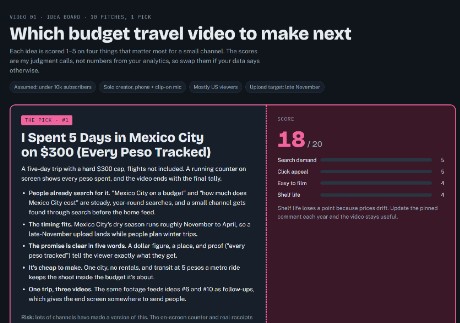 The idea boardTen pitches scored 1 to 5 on search demand, click appeal, ease of filming and shelf life. Mexico City won at 18 of 20: people search for it year-round, a late-November upload lands in the dry season when winter trips get planned, and the same trip feeds two follow-up videos.
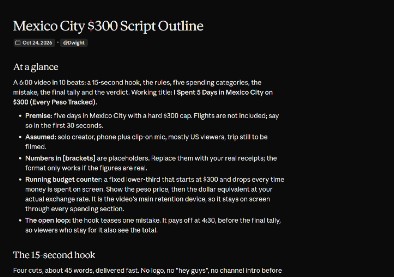 The script outlineThe six-minute structure beat by beat, with the 15-second hook written out, so every scene already has its place in the edit.
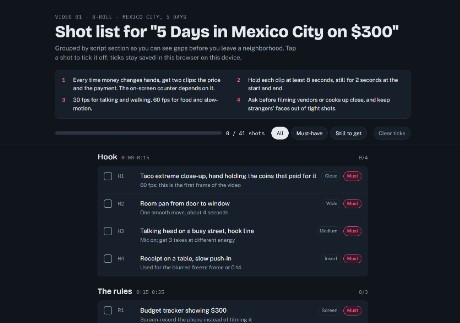 The B-roll shot listEvery shot the edit needs, grouped by section of the script and ranked by priority, to tick off on a phone while filming.
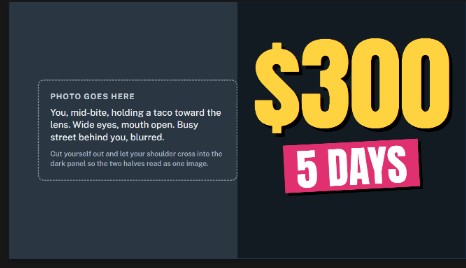 Thumbnail and three titlesThe thumbnail layout and the title options shown together, so they can be judged as a pair, with a note on exactly which photo to take.
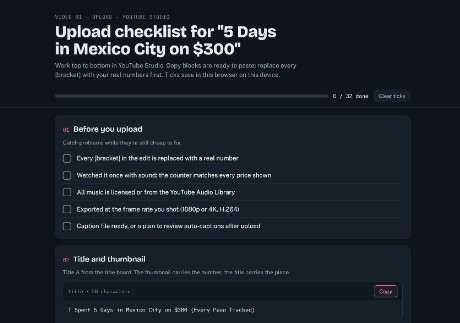 The upload checklistChapters, description and tags, ready to paste into YouTube Studio top to bottom once the placeholders are filled.
Make It Yours
More real AI projects, each with a bundle you can import, are on Miimu's AI page.
Before you go